
Artificial Intelligence (AI) is now a core part of how businesses communicate with users. From automated customer support and AI-generated explanations to smart recommendations, AI delivers answers faster than ever. However, speed and confidence do not always mean usefulness. AI can generate responses quickly and confidently, but it cannot guarantee that those answers truly help real users. How can you be sure an AI-generated answer actually serves a real person?
AI-generated answers may be correct in theory and sound confident. Yet they can still fail to help. They may be unclear, incomplete, or irrelevant. They can leave users confused or not match the user’s level of understanding.
This is where human evaluation becomes essential. Only real people can judge if an AI answer is genuinely useful, clear, and practical. Microworkers gives Employers the chance to get that human perspective at scale.
Why AI Needs Human Judgment
Even the best AI can produce answers that are:
- Confusing or vague
- Incomplete or missing critical steps
- Correct but irrelevant to the real question
- Sound plausible but leave users frustrated
- Miss the real intent behind a question
Only real people can assess whether AI answers are actually helpful, clear, and usable. That’s why a human-powered campaign on Microworkers can transform AI outputs from “technically correct” to truly user-friendly.
The New AI Usefulness Campaign Concept
With this campaign idea, Employers can launch tasks asking Workers to review AI-generated answers and respond to one central question:
“Would this AI answer help a real user?”
Workers examine the AI response in context, evaluate its clarity, relevance, and usefulness, and provide feedback that reflects real-world human experience. Workers check answers for:
- Clarity
- Relevance
- Practical value
Their feedback helps Employers see which AI responses are ready for real-world use and which need improvement.
Why This Matters
Employers can combine AI efficiency with human judgment. They gain insights that AI alone cannot provide, ensuring answers are truly helpful and actionable. The result is AI content that is clearer, more reliable, and better aligned with user needs.
At the same time, Workers take on meaningful microtasks that contribute to real-world AI applications, creating a win-win environment where innovation meets practical human oversight.
Sample Task Template for AI Usefulness Campaigns
This section provides Employers with a clear overview of what to expect in the task template. You can use this default template as-is or modify it to fit the specific needs of your campaign:
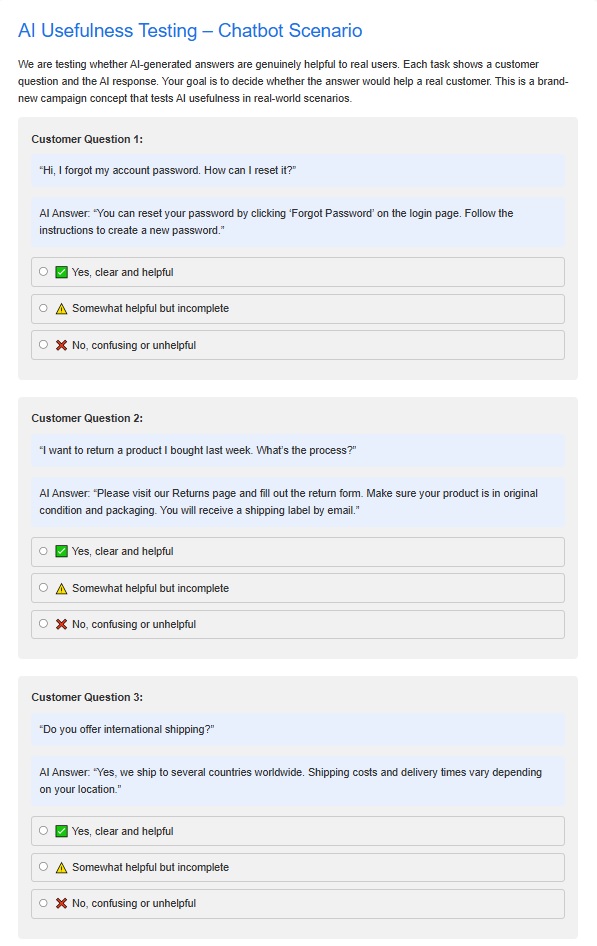
Description of the Template:
- Task Instructions: Workers are given clear instructions on how to evaluate AI-generated answers. The instructions define key criteria such as clarity, relevance, and practical value, ensuring Workers understand how to assess each response.
- AI Response Display: Each task presents the AI-generated answer in full context. This allows Workers to judge whether the answer would truly help a real user.
- Evaluation Questions: Workers are asked to decide whether the answer would help a real customer. The template guides Workers to highlight both strengths and areas for improvement.
- Optional Enhancements for Better Results:
- Include sample scenarios or screenshots to give Workers context.
- Use multiple-choice or checkbox formats for faster evaluation.
- Offer a small bonus for exceptionally detailed or high-quality feedback.
What Employers Can Expect:
- A structured and easy-to-follow template that guides Workers in providing meaningful, actionable feedback.
- Human-verified evaluations that help improve AI outputs before deployment in real-world scenarios.
- Scalable insights across hundreds or thousands of AI responses, allowing you to evaluate performance efficiently.
- Practical, actionable recommendations to refine AI content, making it clearer, more relevant, and user-friendly.
- Cost-effective microtask execution that saves time and resources compared to traditional QA methods.
- Enhanced confidence in AI deployment, ensuring that automated answers align with real user needs and expectations.
Step-by-Step Guide: How Employers Can Launch This Campaign
Step 1: Prepare Your AI Content
Collect the AI-generated responses you want reviewed.
Each task should include:
- One user question
- One AI-generated answer
Keep responses short to ensure fast and accurate evaluation.
Step 2: Create Your Template OR Use a Default Template
- Log in to your “Employer” dashboard
- Click “My Templates” tab and select a default template then edit. If you want to create a new template, click “Create a New Template”. Visit these tutorial videos as your guide in creating a template: Basic TTV Campaign HG TTV campaign
Step 3: Create the Campaign and Submit
- After finalizing the template, click “Create Campaign” and choose either “Create Basic Campaign” or “Create Hire Group Campaign.”
- Enter the necessary details (zone, category, number of positions, cost, title, job requirement(s)/qualifications, time to rate (TTR), tasks rating option)
- Click “Create Campaign and Go to Next” button at the bottom then submit
Practical Tips for Better Campaign Results
- Use predefined Worker groups
Under the Hire Group section, you may select predefined groups such as Best Rated Countries or Top Performers to improve response quality. - Use a CSV file for task input
Upload a CSV file to efficiently manage multiple questions and AI-generated answers. This also helps standardize task structure. - Include a test case file
Add a test case to confirm that Workers are following the instructions correctly. This helps identify low-effort or incorrect submissions early. - Set fair and motivating pay
Appropriate compensation encourages better focus and reduces low-quality responses. - Test in a Sandbox environment first
Create a Sandbox account to test the task flow, instructions, and proof requirements before submitting the campaign in the production environment.
Need Custom Updates?
If you have specific requirements or want to make updates to the template to better suit your campaign, feel free to contact us. We can help tailor the task template to match your goals and ensure you get the most valuable human feedback.
Final Thought
AI can answer questions—but only people can decide if those answers make sense.
With Microworkers, Employers can confidently deploy AI solutions knowing their outputs have been validated by real users, in real-world conditions.
This new campaign idea empowers Employers to create smarter, more reliable AI content, while giving Workers tasks that make a real impact.
No Comments so far.
Your Reply