
Good news! We’ve introduced a new feature that makes task removal easier for workers.
This feature is designed for situations where workers may want to remove a recently completed task after realizing they made a mistake. For example, they may have uploaded the wrong proof, missed one of the required steps, or realized after submitting the task that the proof they submitted was incomplete. Previously, the only way to have these tasks removed was by submitting a request to our Support team. While our team was always happy to help, this often meant waiting for a response before the task could be removed.
With our latest update, that’s no longer necessary. Workers can now remove eligible completed tasks themselves in just a few clicks.
How It Works
We’ve made the process much easier. To remove a task:
- Open the Tasks I Finished page.
- Look for the ❌ (Remove) icon beside the eligible task.
- Click the icon to remove the task.
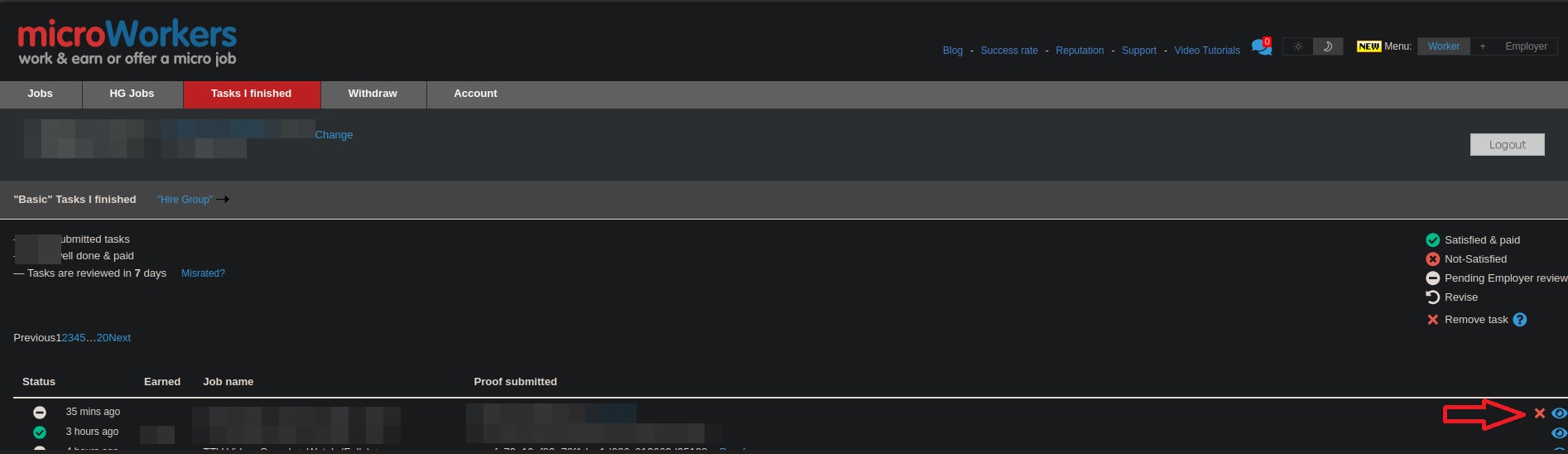
The feature is quick, simple, and only takes a few seconds. No support ticket is required.
Which Tasks Can Be Removed?
The self-removal option is available only for tasks that meet all of the following conditions:
- The task was completed within the last hour (60 minutes).
- The task is not a Qualification Test (QT) campaign.
- The task is not from an External Template (ET) campaign.
If a task does not meet these requirements, the ❌ icon will not be displayed.
Daily Removal Limit
To help prevent misuse while allowing workers to correct mistakes, each worker can remove up to three eligible tasks per day.
In most cases, workers only need to remove a task when they notice a mistake after submission. A limit of three removals per day should be enough for these situations while helping ensure that the feature is used as intended.
Why We Made This Change
Our goal is to make the Microworkers experience easier and more convenient.
With this update, workers can:
- Remove eligible tasks right away.
- Correct simple mistakes more easily by taking the task again (if it’s still available) and submitting the correct and complete proof/s.
- Help maintain a better success rate by removing tasks submitted with mistakes.
Give It a Try
The next time you visit your Tasks I Finished page, look for the ❌ icon beside your recently completed tasks. If it’s there, your task is eligible for self-removal and can be removed with a single click.
As always, we’ll continue working on improvements that make Microworkers simpler and more convenient to use. 😉
No Comments so far.
Your Reply