
What happens when AI reads a receipt that is crumpled, faded, or partially unreadable? While artificial intelligence (AI) can process thousands of images in seconds, real-world data often presents challenges that go beyond clean and structured inputs. From crumpled receipts and blurred text to stylized product labels, these imperfections can lead to errors that affect business decisions. This is where human intelligence becomes essential—and where Microworkers plays a vital role in supporting AI accuracy.
The Challenge of Real-World Data
In controlled environments, AI systems perform well. But in practice, businesses face several challenges when processing real-world images:
- Crumpled or damaged receipts
- Blurry or low-quality images
- Inconsistent lighting or shadows
- Unusual fonts or stylized text
- Partial or obstructed text
- Similar-looking characters (e.g., “O” vs “0”)
Even minor errors—like a misread number or missing character—can significantly impact financial reports, inventory management, or market research.
Why AI Alone Is Not Enough
AI can process large amounts of data quickly, but it does not always understand context or ambiguity. A system might assign a high confidence score to a misread receipt or label, which can result in flawed datasets.
Human verification is the key to bridging this gap, ensuring that AI-generated data is reliable and accurate.
How Microworkers Supports AI Accuracy
Microworkers provides access to a global workforce capable of performing microtasks that validate and correct AI-generated data.
Tasks typically include:
- Verifying extracted text from receipts, labels, and storefronts
- Correcting OCR errors in crumpled or low-quality images
- Identifying missing or incomplete text
- Matching AI-extracted data with the original image
- Selecting the correct text from multiple AI outputs
By breaking complex validation into simple microtasks, businesses can scale verification processes efficiently.
Sample Campaign: Verify AI-Extracted Text from Crumpled Receipts
To better understand how real-world data impacts AI accuracy, let’s look at an actual example of a crumpled receipt processed by an OCR system.
Due to folds, shadows, and smudges, the AI-generated output contains several errors that require human verification.
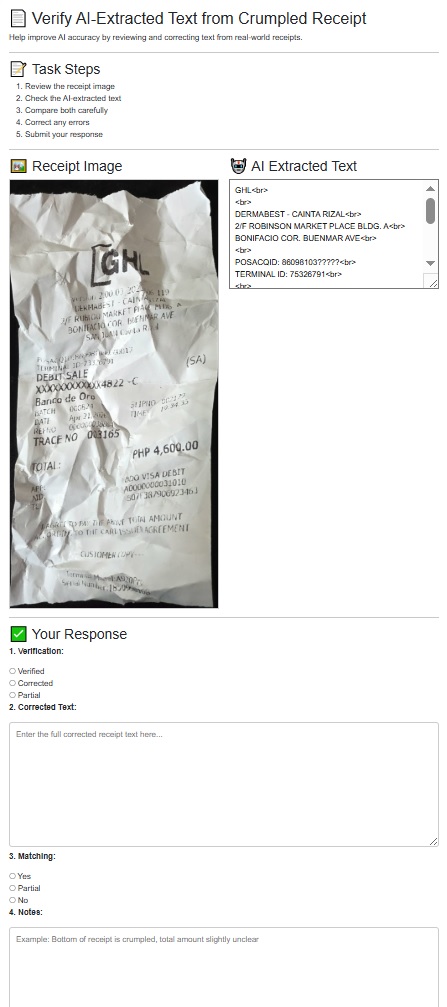
Task Steps:
- Open the provided image of the crumpled receipt.
- Review the AI-extracted text.
- Compare the extracted text with the original image.
- Correct any mistakes or missing information (item names, numbers, totals, dates).
- Submit your verified or corrected text using the checkbox format below.
Expected Output / Sample Format (Checkbox Style)
- Verification:
-
☐ Verified – All readable text is correct
-
☐ Corrected – Errors were found and corrected
- ☐ Partial – Some text is unreadable
- Corrected Text (if applicable):
[Insert corrected text here]
- Matching with Original Receipt:
- ☐ Yes – AI text matches the receipt after correction
- ☐ Partial – Only part of the text matches
- ☐ No – Significant differences
- Optional Note / Comments:
[Example: “Bottom of receipt crumpled, last digit of total unclear”]
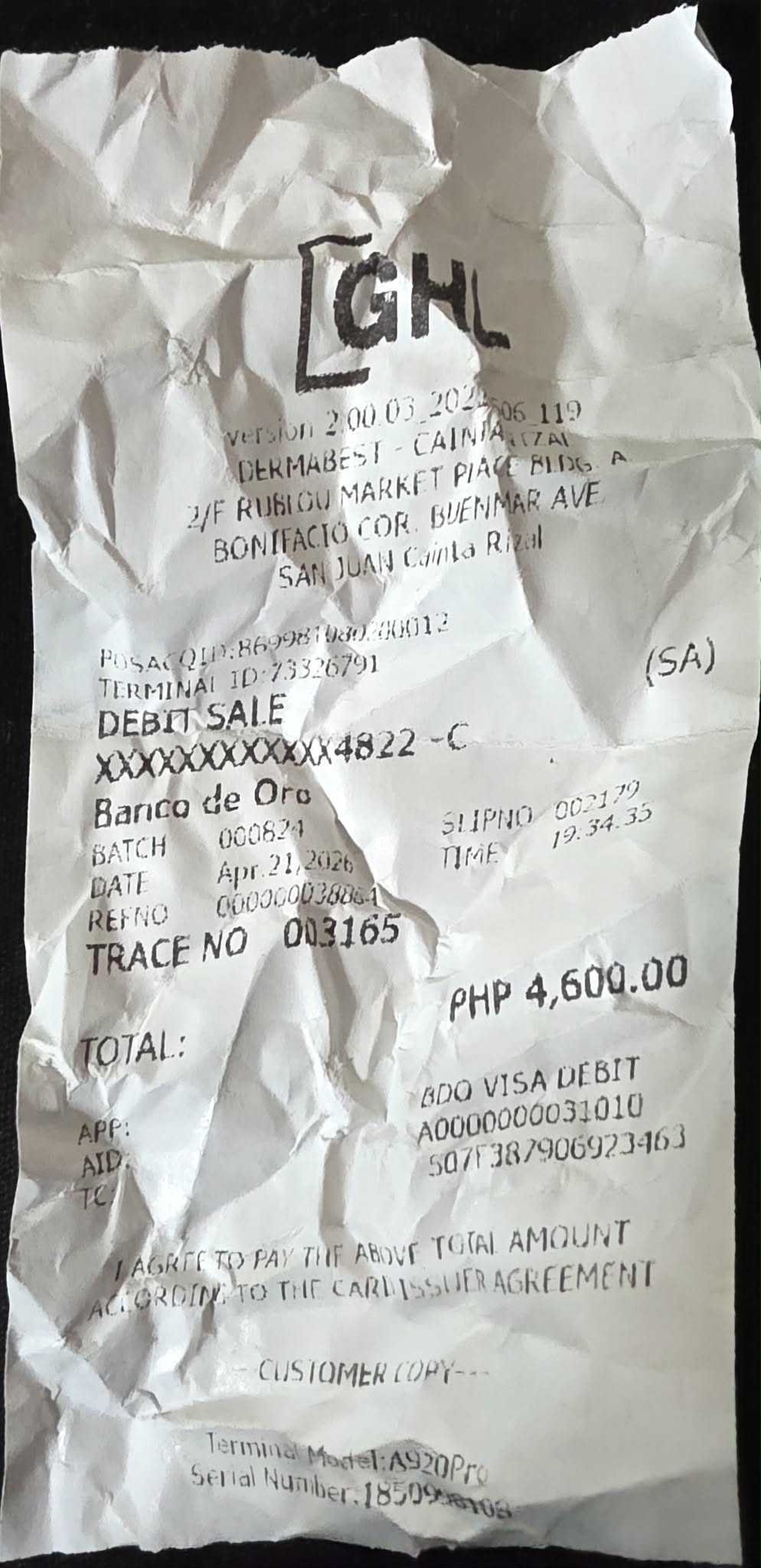
AI Extracted Text:
GHL
DERMABEST – CAINTA RIZAL
2/F ROBINSON MARKET PLACE BLDG. A
BONIFACIO COR. BUENMAR AVE
POSACQID: 86098103?????
TERMINAL ID: 75326791
DEBIT SALE
XXXXXXXXXXXX4822 – C
BATCH 000824
DATE Apr 21 2026
TRACE NO 003165
TOTAL: PHP 4,600.00
Example Filled-Out Response
- Verification:
- ☐ Verified – All readable text is correct
- ☐ Corrected – Errors were found and corrected
- ☑ Partial – Some text is unreadable
- Corrected Text:
(Only corrected readable parts)
- Matching with Original Receipt:
- ☐ Yes – AI text matches the receipt after correction
-
☑ Partial – Only part of the text matches
- ☐ No – Significant differences
- Optional Note / Comments:
Some parts unreadable due to heavy crumpling, especially POSACQID section.
Try Our Default Campaign Template
Want to test this workflow for your own AI or OCR project? Getting started is easier than you think.
To help you quickly launch your first campaign, we’ve created a ready-to-use default template based on the exact example shown above. This template is designed to help you collect accurate human verification for crumpled and/or blurred receipts and other real-world data.
🔹 How It Works
- Upload your dataset (e.g., receipt images + AI-extracted text) via CSV
- Launch the campaign using the template
- Workers review and correct the data
- Collect structured, high-quality outputs
Within minutes, you can start receiving verified and corrected data at scale.
Human + AI: Best of Both Worlds
Workflow:
- AI extracts text
- MicroWorkers verify and correct
- Clean data is analyzed
This combination ensures speed and reliability, allowing businesses to scale without errors.
Business Impact
Accurate data is essential for:
- Financial processing
- Retail analysis
- Market research
- Database management
Using Microworkers, businesses can reduce errors, improve datasets, enhance AI models, and make better data-driven decisions.
Stop Letting Bad Data Cost You Money
Every misread receipt, incorrect total, or missing detail isn’t just a small error—it’s a risk to your business. Inaccurate data can lead to poor decisions, financial discrepancies, and unreliable analytics.
AI can move fast—but without human verification, it can also be wrong.
Microworkers helps you fix that.
Access a global workforce to verify, correct, and validate data at scale. Perfect for receipts, product labels, and other complex real-world inputs.
🚀 Don’t wait for errors to pile up. Take control of your data quality today.
👉 Create your Microworkers campaign now and turn imperfect data into accurate, actionable insights. 😉
No Comments so far.
Your Reply